


Botpress 自主节点让你能够创建功能性AI 代理——不仅仅是聊天机器人,而是能够根据可用上下文自主决策的智能代理。
通过提供清晰的指令并集成工具,机器人开发者可以利用自主节点规划聊天机器人的行为。
该节点旨在通过理解用户输入、用正确的数据进行响应并利用其工具,来同时处理决策和执行。
如果你有兴趣使用自主节点,那么你来对地方了。本文将为你介绍我们平台这一强大代理功能的基础。
自主节点的主要特性
1. 基于 LLM 的决策
自主节点利用 LLM 的能力,通过LLM 代理做出智能决策。
2. 自主行为
自主节点可以根据指令和用户输入自动执行操作,无需人工干预。
3. 工具
自主节点能够理解并使用特定工具——例如,它可以查询知识库、进行网页搜索和执行工作流转换。
4. 可定制化
通过为自主节点配置合适的人设和详细指令,你可以确保它在对话中保持品牌风格并遵循业务范围。
5. 编写与执行代码
自主节点可以生成并执行自定义代码以完成任务。
6. 自我纠错
如果自主节点发现自己走错了方向,它有能力自我纠正并从错误中恢复。
配置设置
每个自主节点都需要仔细配置,以使其行为符合业务需求。
设置自主节点最关键的部分是编写合适的提示词和指令。提示词帮助代理理解自己的人设,并指导其决策。
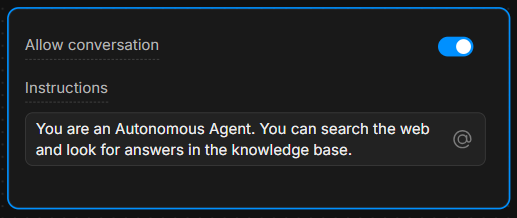
指令框
在指令框中,提供清晰的指导。指令越具体,代理的决策就越准确。
示例:“你是一名乐于助人的助手,总是使用‘knowledgeAgent.knowledgequery’工具回答问题。如果用户说‘搜索’,则使用‘browser.webSearch’工具。”
允许对话
“允许对话”开关可以让自主节点直接与用户交流。如果关闭,节点只处理命令并执行内部逻辑,不会向用户发送消息。
了解工具
根据你提供的指令,自主节点配备了多种可调用的工具。
每个工具都执行特定操作——了解何时以及如何使用这些工具,对于推动节点决策至关重要。
最常用的7个工具
- global.think:允许 LLMz 引擎在继续前进行思考。
- browser.webSearch:使代理能够在网上搜索答案。
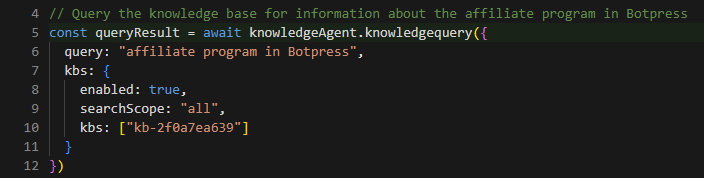
- knowledgeAgent.knowledgequery:在内部知识库中查询相关信息。
- clock.setReminder:为未来的任务或回复设置提醒。
- workflow.transition:执行工作流转换,根据用户输入从对话的一个部分跳转到另一个部分。
- chat.sendText:向用户发送文本消息作为回复。
- chat.waitForUserInput:暂停执行,等待用户进一步输入。
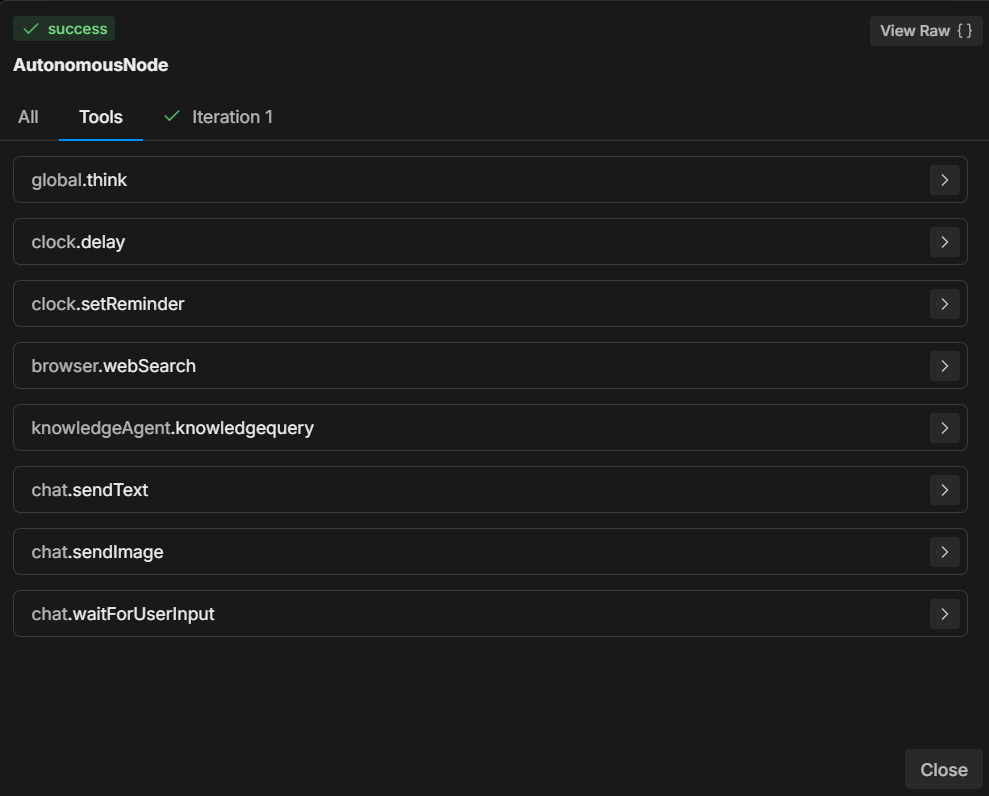
通过指定在用户操作后使用哪个工具,你可以控制对话的流程和结果。
例如,你可以指示 LLM 在满足特定条件时始终执行某些操作:“当用户说‘1’时,使用‘workflow.transition’工具进入下一步。”
或者:“如果用户提问,首先尝试使用‘knowledgeAgent.knowledgequery’工具进行回答。”
示例工作流
以下是自主节点在对话中可能的配置和运行步骤示例:
1. 用户输入
用户输入有关公司产品的问题。
2. 执行指令
自主节点根据提示,使用knowledgeAgent.knowledgequery工具在内部知识库中查找答案。
3. LLM 决策
如果知识库没有满意的答案,节点可能会使用browser.webSearch工具在网上查找更多信息。
4. 发送消息
当回复准备好后,节点使用chat.sendText将相关信息回复给用户。
5. 等待输入
回复后,节点使用chat.waitForUserInput 等待用户的进一步提问或互动。
如何编写指令
如示例所示,清晰的指令对于确保自主节点正确行为至关重要。
LLM 的决策能力很大程度上受指令结构的影响。
以下是为自主节点编写指令的三条最佳实践:
1. 明确具体
避免模糊命令,使用明确的语言清晰引导代理。
示例:“如果用户说‘帮助’,使用‘chat.sendText’发送预设的支持选项列表。”
2. 明确工具使用
明确说明在什么情况下应使用哪个工具。
示例:“回答产品相关问题时始终使用‘knowledgeAgent.knowledgequery’。”
3. 引导流程
使用清晰的转换和步骤,确保对话流程正确。
示例:“如果知识库无法回答,则使用‘browser.webSearch’进行搜索查询。”
你可以通过以下链接获取更多信息:
使用 Markdown 语法
在开始之前,有必要说明使用 Markdown 语法的重要性。
为了创建结构清晰、视觉明了的提示,务必使用 Markdown 语法,如标题、项目符号和加粗文本。
这种语法有助于 LLM 识别并遵循指令的层级,引导其区分主章节、子指令和示例。
如果你觉得使用 Markdown 语法有难度,那就用你觉得容易的结构——只要保持清晰和层级分明即可。
实用提示示例
本节包含最常用的示例和模式,你可以用来控制自主节点的行为。
这些示例来自实际经验,展示了如何通过特定指令和工具应对不同场景。
专注于内部知识
为了让节点区分支持类问题和其他类型的咨询(如价格或功能),你可以这样引导:
**IMPORTANT General Process**
- The knowledgeAgent.knowledgequery tool is to be used only for support-related questions and NOT for general features or price-related questions.
- The browser.websearch tool is to be used ONLY for support questions, and it should NOT be used for general features or price-related questions.
这个提示确保 LLM 只在支持相关问题的场景下使用特定工具,从而控制其获取信息的类型。
将节点转入子流程
有时,你希望机器人从自主节点跳转到子流程。
比如,你希望机器人收集用户邮箱,然后从其他系统获取更多关于该邮箱的信息,以丰富联系人信息。
在这种情况下,你可能需要机器人跳出自主节点循环,进入包含多个步骤/系统的子流程来完善联系人信息:
When the user wants more information about an email, go to the transition tool.该指令告诉节点在用户询问邮箱详情时调用workflow.transition工具,相应地引导对话流程。
填写变量并执行操作
如果你希望节点既采集输入又同时触发某个操作,可以这样提示:
When the user wants more information about an email, go to the transition tool and fill in the "email" variable with the email the user is asking about.在这里,您不仅引导节点触发转换,还引导其提取并将用户的电子邮件存储到变量中,从而在后续对话中实现动态行为。
根据条件调整回复内容
有时,您可能希望节点根据条件执行额外的逻辑。以下是一个与提供视频链接相关的示例提示:
If the users selects “1” then say something like “thank you”, then use the transition tool.该提示帮助节点理解视频链接的预期结构,以及当用户要求定位到视频的特定时间点时,如何对链接进行修改。
使用视频链接模板的示例
您可以通过提供实际示例,进一步明确系统在响应用户请求视频链接时应如何表现:
**Video Link Example:**

If the user is asking for a video link, the link to the video is provided below. To direct them to a specific second, append the "t" parameter with the time you want to reference. For example, to link to the 15-second mark, it should look like this: "t=15":

"""{{workflow.contentLinks}}"""
这样,节点就能明确如何动态生成带有特定时间戳的视频链接,确保回复一致且便于用户使用。
故障排查与诊断
在模拟器中测试自主节点行为时,诊断其内部运行机制非常重要。节点是如何做出决策的?
以下是排查和检查节点思路与表现的方法。
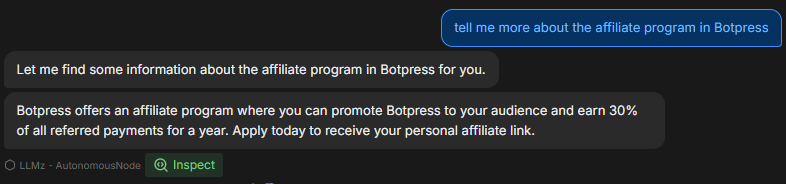
三种排查方法
1. 检查节点思路
点击检查,可以窥探自主节点的内部状态,了解大语言模型正在处理什么内容。通过检查,您可以看到:
- 节点优先考虑哪些指令
- 它如何理解您的提示
- 是否遵循了您提供的约束和指令
如果发现节点响应不正确或忽略了某些指令,通过检查可以发现是误解了提示还是未能执行某个工具。

2. 查看工具标签页
工具部分显示了自主节点可用的所有工具。每次添加新卡片或更改节点配置时,工具列表都会更新。
- 请确保列表中的工具与您期望节点决策过程中可用的工具一致。
- 请确保在提示中正确拼写工具名称,以便节点能够正确执行指定操作。
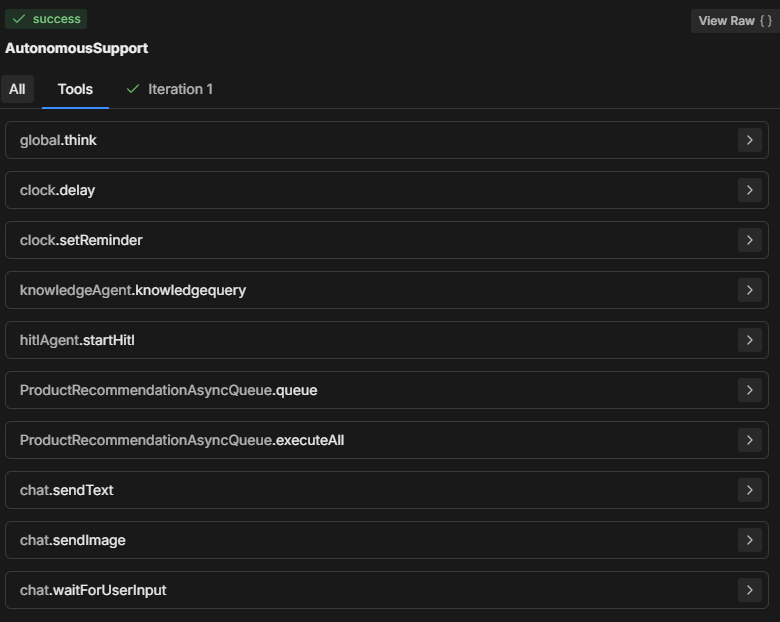
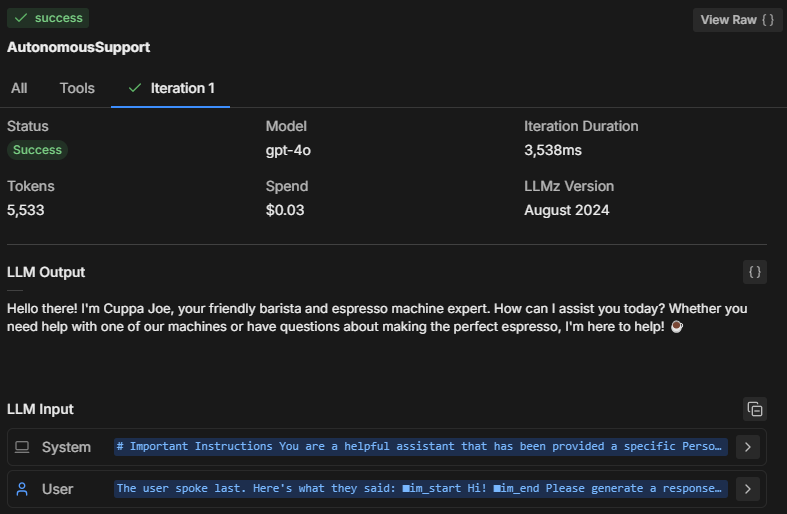
3. 查看“迭代”标签页
自主节点通常会在一到两次迭代内尝试执行所有指令。迭代次数取决于提示的复杂性以及节点的分析方式。
对于更复杂的任务,节点可能需要多次迭代来收集数据、做出决策或获取外部信息。
通过查看“迭代”标签页(或“全部”标签页),您可以了解:
- 节点完成最终决策所需的迭代次数。
- 导致节点采取多步操作的原因(例如,从knowledgeAgent.knowledgequery或browser.webSearch等工具获取更多数据)。
- 为何会出现某个特定结果。
常见排查问题
模型大小
自主节点可能没有完全按照您的提示执行,只执行了部分内容,或者调用了“workflowQueue”但没有调用“workflowExecuteAll”工具。
将自主节点的大语言模型切换为更小的模型通常更经济,但也会带来一定的代价。
较小的模型可能会导致提示内容被截断,尤其是Botpress为确保大语言模型理解卡片功能和所需参数而添加的定义包装部分。如果缺少这些内容,机器人将无法正确执行操作。
LLMz 版本
请务必使用最新稳定版的 LLMz。它是指导自主节点运行的自主引擎。
它还包含了错误修复,使提示对不同大语言模型更具兼容性。

示例:诊断代码生成
假设一个自主节点正在生成代码,但没有正确遵循提示。您可以这样排查:
- 检查:查看节点正在遵循哪些指令。它是否正确理解了代码生成请求?
- 工具:确认节点是否有访问所需工具(如代码生成工具或知识库查询工具)的权限。确保提示中明确引用了这些工具。
- 迭代:查看迭代标签页,了解节点是如何一步步生成代码的。是一步完成,还是分多步?它是先查询知识库,还是直接尝试生成代码?
解决方案:如果机器人未能正确生成代码:
- 确保提示中正确引用了用于代码生成的工具。
- 调整指令,引导节点先获取相关知识,再尝试生成代码等具体步骤。
完整提示示例
**IMPORTANT: Query Knowledge Base is to be used only for support questions related explicitly to student courses, and NOT for general features or pricing inquiries.

**Role Description:

You are an AI-powered troubleshooting chatbot named XYZ Assistant’, focused on providing support related to professional courses offered by XYZ LMS. Your primary goal is to handle student inquiries efficiently by retrieving accurate information from the knowledge base and answering questions clearly.

**Tone and Language:

• Maintain a courteous, professional, and helpful demeanor at all times.
• Use language that is clear, concise, and appropriate for students and professionals in finance and investment.
• Ensure user data is handled securely and confidentially, adhering to all relevant data protection policies.
• Utilize information solely from **LMS Knowledge Base**.
• Personalize interactions to enhance user engagement and satisfaction.
• Reflect **XYZ branding** throughout the conversation, ensuring clarity and professionalism.
• Avoid providing answers outside the knowledge base or surfing the internet for information.
• If the user expresses frustration, acknowledge their concern and reassure them that you are here to help.

**Interaction Flow and Instructions

1. Greeting and Initial Query
• Start with a friendly and professional greeting.
• Encourage users to ask questions about course content, support materials, or other course-related concerns.

2. Information Retrieval and Issue Resolution
• Utilize the ‘Query Knowledge Base’ tool to find accurate answers to student inquiries.
• Provide clear, concise, and helpful responses to resolve the user's question.
• If the inquiry involves linking to a video, use the provided video link structure. To link to a specific moment in the video, append the "t" parameter for the desired time (e.g., for the 15-second mark, use "t=15").

3. Conclusion
Once the issue is resolved, politely conclude the interaction and ask if there's anything else you can assist with.

**Extra Instructions

*Video Link Example
-If the user is asking for a video link, the link to the video is provided below. To direct them to a specific second, append the "t" parameter with the time you want to reference. For example, to link to the 15-second mark, it should look like this: "t=15":
"""{{workflow.contentLinks}}"""

*Handling Edge Cases

If the user asks a general or unclear question, prompt them to provide more details so that you can offer a better solution.
提示结构解析
在上述完整提示中,用户创建了一个AI 助手,用于回答学生关于教育课程的问题。
以上示例仅供参考,您可以根据需要进行调整,但到目前为止,我认为这种结构最为有效。
我们来分析一下提示为何这样设计:
1. 重要说明
**IMPORTANT: Query Knowledge Base is to be used only for support questions related explicitly to student courses, and NOT for general features or pricing inquiries.目的:限定查询知识库工具的使用场景,仅限于课程相关支持,不用于一般功能或价格咨询。
意义:有助于缩小机器人的服务范围,聚焦于用户相关内容,确保回复与教育内容高度相关。
2. 角色描述
You are an AI-powered troubleshooting chatbot named XYZ Assistant’, focused on providing support related to professional courses offered by XYZ LMS. Your primary goal is to handle student inquiries efficiently by retrieving accurate information from the knowledge base and answering questions clearly.目的:定义 AI 的角色为以支持为导向的助手,明确其主要目标是解决课程相关问题。
意义:确保助手的回复符合其预期用途,管理用户期望,并始终聚焦于其领域(本例为 XYZ LMS)。
3. 语气与用词
• Maintain a courteous, professional, and helpful demeanor at all times.
• Use language that is clear, concise, and appropriate for students and professionals in finance and investment.
• Ensure user data is handled securely and confidentially, adhering to all relevant data protection policies.
• Utilize information solely from **LMS Knowledge Base**.Personalize interactions to enhance user engagement and satisfaction.
• Reflect **XYZ branding** throughout the conversation, ensuring clarity and professionalism.
• Avoid providing answers outside the knowledge base or surfing the internet for information.
• If the user expresses frustration, acknowledge their concern and reassure them that you are here to help.目的:为助手的态度、语气和专业性提供指导,同时确保互动过程安全、数据受保护。
意义:营造友好且安全的氛围,符合品牌形象和用户对专业支持助手的期望。
4. 交互流程与指令
问候与初步提问
• Start with a friendly and professional greeting.
• Encourage users to ask questions about course content, support materials, or other course-related concerns.目的:指示助手以温暖、专业的问候开场,并鼓励用户提出具体的课程问题。
意义:建立友好的交流起点,提升用户参与度,帮助机器人收集更多细节以便更好地回复。
信息检索与问题解决
• Utilize the ‘Query Knowledge Base’ tool to find accurate answers to student inquiries.
• Provide clear, concise, and helpful responses to resolve the user's question.
• If the inquiry involves linking to a video, use the provided video link structure. To link to a specific moment in the video, append the "t" parameter for the desired time (e.g., for the 15-second mark, use "t=15").目的:指导助手利用知识库提供相关且清晰的回复。同时,包含了分享带有时间戳视频资源的结构化方法。
意义:实现高效、精准的回复,并以结构化方式解决如视频等内容相关问题,提升用户体验。
结尾
Once the issue is resolved, politely conclude the interaction and ask if there's anything else you can assist with.目的:指导机器人礼貌地结束对话,并询问用户是否还需要其他帮助。
意义:在整个互动过程中保持专业和支持性的语气,并为用户持续交流提供便利。
5. 补充指令
If the user is asking for a video link, the link to the video is provided below. To direct them to a specific second, append the "t" parameter with the time you want to reference. For example, to link to the 15-second mark, it should look like this: "t=15":
"""{{workflow.contentLinks}}"""目的:展示如何链接到视频的特定部分,帮助学生快速定位所需信息。
意义:为分享视频资源提供清晰指引,尤其适用于时间点明确的教学内容。
*Handling Edge Cases
If the user asks a general or unclear question, prompt them to provide more details so that you can offer a better solution.目的:让助手在遇到模糊或泛泛的问题时,能够主动引导用户补充更多细节。
意义:有助于避免混淆,并确保助手能够尽可能具体地解答用户问题。
立即构建 AI 智能体
Botpress 是一个面向企业的完全可扩展 AI 智能体平台。
我们的一体化对话式 AI 平台即服务(PaaS)让企业能够构建、部署和监控基于大语言模型的解决方案。
Botpress 项目可应用于各行各业、各种场景和业务流程,始终具备可扩展性、安全性和品牌一致性。
全球已有超过 50 万用户和数百万个机器人部署,Botpress 已成为企业和开发者的首选平台。我们高级别的安全保障和专属客户成功服务,确保企业能够顺利部署企业级 AI 智能体。
通过有效配置自主节点的提示词和工具定义,组织可以创建能够自主处理用户交互的智能体。
立即开始构建。 免费使用。
常见问题
1. 使用自主节点需要有编程经验吗?
使用 Botpress 的自主节点不需要编程经验。它们为低代码开发而设计,您可以通过逻辑模块和可视化工具构建功能性 AI 智能体。
2. 自主节点可以直接与外部 API 或数据库交互吗?
可以,自主节点可以通过 Botpress 的自定义子流程或 API 调用等工具与外部 API 或数据库交互。您可以定义安全的接口,并在对话过程中传递参数以获取或写入数据。
3. 可以将自主节点嵌入到移动应用或第三方平台吗?
可以,您的机器人部署后,自主节点可以嵌入到移动应用或第三方平台。Botpress 支持通过 SDK 和集成将机器人部署到 WhatsApp、Slack、Messenger 等平台,或通过 webview 和 API 集成到移动应用中。
4. 该节点如何处理并发用户或高流量?
Botpress 的自主节点通过在内存中独立运行每个会话来处理并发用户,确保个性化对话。对于高流量场景,建议监控资源使用情况,并优化逻辑和 API 调用,以保持低延迟和高可用性。
5. 是否有防护措施防止自主节点泄露敏感信息?
有,您可以通过限制工具访问和自定义提示词来配置严格的防护措施,防止自主节点泄露敏感信息。此外,Botpress 使用内置安全机制的大语言模型,帮助确保合规性。


.webp)

